Getting Started with the NuGuard Open Source Library
An Essential Tool in an Agentic AI Developer's Toolkit
By Uma Ramanathan, August 10, 2026
Stop Shipping Risks: Build Trust Into Your AI Agents
Most teams do not discover the real problems in development. They discover them in production, under real user pressure, with real business impact. When that happens, fallout is immediate: users lose trust, internal stakeholders become cautious, and AI adoption starts to look risky instead of transformative.
This is exactly where NuGuard changes the outcome. It lets development teams run behavior and red-team testing on their agents before release, so critical gaps are found before customers find them. Instead of shipping and hoping, you ship with evidence.
One of NuGuard's biggest strengths is deployment flexibility. In restricted or air-gapped environments, teams can still get strong value from AI-SBOM generation (asset discovery), static analysis, and policy workflows that run fully in local environments. When you want LLM-assisted capabilities, you can bring your own model or provider and control configuration through your own environment and settings.
If you are just getting started, this guide will help you go from zero to useful results in a couple of hours.
The Trust Gap Agent Teams Face Today
Agent security is not just classic app security with a chatbot attached. Agents create a different risk profile because they can reason, call tools, and take multi-step actions. In production agent systems, the highest-risk concerns are usually:
- Prompt injection and goal hijacking, where untrusted input changes agent intent and steers execution into unsafe actions.
- Tool abuse and excessive agency, where an agent can call high-impact tools (filesystem, network, admin APIs, payments, messaging) with broader privileges than required.
- Data exfiltration paths, where sensitive context leaks through model responses, tool outputs, logs, memory stores, or cross-tenant retrieval.
- Identity and authorization boundary failures, where the agent acts outside user scope because session context, role checks, or delegated auth are weak.
- Multi-agent trust abuse, where one agent or plugin can poison shared memory, inject malicious instructions, or influence downstream decisions.
- Runtime drift, where behavior in real traffic diverges from design assumptions, test prompts, and pre-release validation.
These are hard to catch with unit tests and manual spot checks alone. Teams need an agent-specific security workflow that continuously validates behavior before release and under realistic runtime conditions.
NuGuard Is a Must-Have in an Agentic Developer's Toolkit
NuGuard fits naturally into the way developers already work. You point it at your source and your running endpoint, and it gives you concrete findings you can act on.
At the center of the NuGuard approach is an AI-SBOM-first workflow: first generate an AI Software Bill of Materials (AI-SBOM) to obtain a precise inventory of agent components, then use it as the foundation for runtime validation through behavior and red-team testing. Instead of guessing where your AI risks live, you can now see them.
How to Use NuGuard for Your Agent
Prerequisites
You should have either a local folder that contains your agent source code or a GitHub repository that NuGuard can scan.
With source access alone, NuGuard can still produce concrete security evidence — you can generate an AI-SBOM, analyze it for structural and supply chain risks, and validate its policy structure and coverage. If you have a sandbox endpoint where the agent is running, you can also run dynamic behavior and red-team tests against the live runtime. Connecting an LLM unlocks more contextualized, targeted, and deeper behavior and red-team tests on top of that.
Workflow
NuGuard commands flow naturally into a logical workflow:
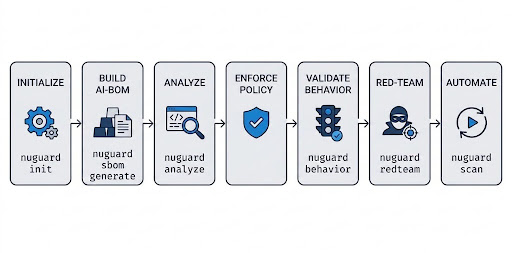
- Initialize once: set your baseline — Install the NuGuard library, then run nuguard init to create a ready-to-use project config and starter policy template.
- Build your AI-SBOM: map what actually exists — Run nuguard sbom generate for an inventory of models, prompts, tools, endpoints, data stores, and dependencies.
- Analyze: catch structural risk before runtime — Run nuguard analyze to identify architecture, dependency, and supply-chain issues.
- Enforce policy: turn intent into checks — If your team uses cognitive policy, validate it, compile it into controls, and check those controls against your AI-SBOM.
- Validate behavior: test real runtime responses — Run nuguard behavior against your target endpoint to detect guardrail and policy drift.
- Red-team hard: probe adversarial paths — Run nuguard redteam to pressure-test the system with high-impact attack scenarios.
- Automate the loop: run end-to-end with one command — Use nuguard scan to orchestrate the core workflow in a single pass.
A Step-by-Step Quick Start
This quickstart gets NuGuard running on your agent in under a couple of hours, with your first AI-SBOM, analysis report, and runtime test results. Run the following commands from the folder that contains your source code. If you are scanning a GitHub repo, create and use a clean NuGuard working folder for outputs and config files.
Step 0: Set Up a Python Virtual Environment
Virtual environments isolate your project dependencies, preventing version conflicts from breaking your global Python installation or other projects.
python -m venv .venv
.venv\Scripts\activate
Step 1: Install NuGuard
pip install nuguard
nuguard --help
Step 2: Initialize NuGuard Configuration
nuguard init
Step 3: Generate an AI-SBOM
Choose one of the following options based on where your code lives.
Option 1: Local folder
nuguard sbom generate --source . --output app.sbom.json
Option 2: Public remote repository
nuguard sbom generate --from-repo https://github.com/org/repo --ref main --output app.sbom.json
Option 3: Private remote repository
nuguard sbom generate --from-repo https://github.com/org/private-repo --ref main --token <github_token> --output app.sbom.json
Open app.sbom.json to inspect the generated inventory of models, prompts, tools, endpoints, datastores, and dependencies.
Step 4: Run Static Analysis
nuguard analyze --sbom app.sbom.json --format markdown --output analyze.md
To unlock more comprehensive analysis capabilities, install the following optional scanner integrations: Semgrep, Checkov, Grype, and Trivy. Open analyze.md to review static findings, severity levels, tool coverage, and any available remediation guidance.
Keep your agent running in a sandbox environment with a reachable test endpoint before running behavior, red-team, or full runtime scan flows.
Step 5: Run Behavior Testing
Uncomment sbom: ./app.sbom.json in your nuguard.yaml file, then run:
nuguard behavior --dynamic --target <agent_sandbox_URL> --format markdown --output behavior.md
Replace <agent_sandbox_URL> with your agent's API endpoint; the library targets the /chat path unless configured otherwise in nuguard.yaml. If login credentials are needed, they should be set up in nuguard.yaml. Open behavior.md to inspect specific behavioral results, evaluate guardrail and policy performance, and identify any active runtime risk signals.
Step 6: Run Red-Team Testing
nuguard redteam --sbom app.sbom.json --target <agent_sandbox_URL> --format markdown --output redteam.md
Open redteam.md to examine adversarial results and discover actionable steps for addressing identified risks.
If you have access to an LLM and want to use it with NuGuard, nuguard.yaml is your project configuration file for enabling LLM features:
- Set
LITELLM_API_KEYin your environment. - In nuguard.yaml, set
llm.modelto the model you want to use, then setsbom_generation.llm: true,behavior.llm: true, andredteam.llm: true. - Run the same Step 3, Step 5, and Step 6 commands.
For effective red-team testing, you will need an LLM with no content filtering and no safeguards to produce the required adversarial prompts.
Advanced Options
NuGuard gives you fine-grained control through nuguard.yaml and CLI flags. Once the basics are working, these are the most useful advanced configuration areas:
- Target and auth configuration: set shared target URL, endpoint path, auth mode, and headers for behavior and red-team runs.
- LLM configuration: choose model/provider, control where LLM is used (sbom_generation.llm, behavior.llm, redteam.llm), and tune eval behavior.
- Behavior tuning: adjust scenario/workflow coverage, concurrency, timeouts, isolation, and severity-based fail thresholds for CI.
- Red-team tuning: control profile, scenario selection, impact thresholds, guided conversation settings, catalogs, canary checks, and execution pacing.
- Policy and governance: validate, compile, and enforce cognitive policy controls as part of security checks.
- Output and pipeline integration: generate markdown/json/sarif artifacts and wire fail-on severity thresholds into automated gates.
Refer to the NuGuard CLI reference for the full set of commands and flags.
Open Source Path for Advanced Users
NuGuard is open source, and advanced users can go far beyond out-of-the-box usage. If you need domain-specific security checks, custom workflows, or deeper integration patterns, fork the repo and adapt the components to your environment, then contribute your improvements back so the whole ecosystem benefits.
Start here: github.com/NuGuardAI/nuguard
Conclusion
Trustworthy agentic AI does not have to feel heavy or slow. With NuGuard, you can start quickly, get useful findings fast, and grow into deeper assurance as your product matures. It is practical, developer-friendly, and genuinely useful once you see how quickly it surfaces what matters.
Related Articles
What Is Prompt Injection, and How Do You Prevent It in AI Agents?
Prompt injection is the top security risk for AI agents. See real attacks on Copilot, Slack AI and MCP, and a layered defense playbook you can ship this sprint.
AI Security and Compliance Before Production
Scope the application with an AI-SBOM, test its controls in a sandbox, fix what fails, and keep evidence that GRC, legal and security teams can review before an AI release is approved.
How Do You Secure AI Agents Before Production?
A 10-point release gate for AI agents, mapped to the OWASP Top 10 for Agentic Applications, covering identity, tool access, prompt injection testing, sandboxing, human approval and a tested kill switch.