NuGuard quick start
Map an AI application, set its boundaries, find risks, test controls, and carry evidence into release decisions. Start with source code; add a sandbox target when you are ready for runtime tests.
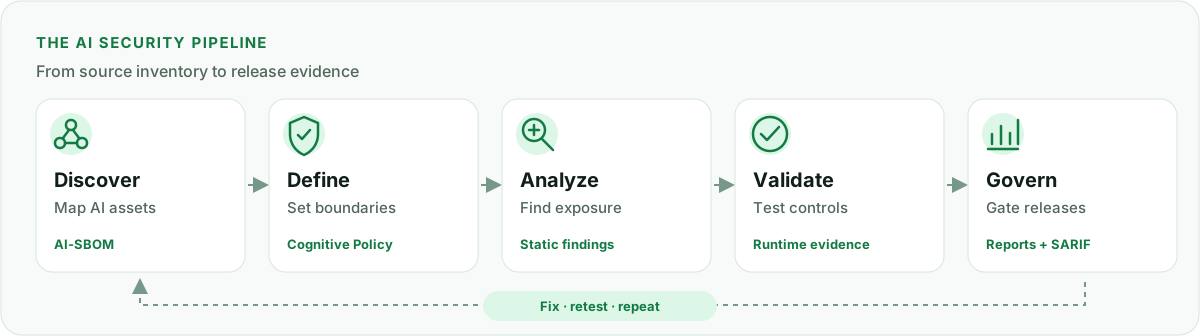
| Stage | What you get | NuGuard starting point |
|---|---|---|
| Discover | An AI-SBOM of agents, models, tools, dependencies, and data paths | nuguard sbom generate |
| Define | A Cognitive Policy describing allowed behavior and restricted actions | nuguard policy validate |
| Analyze | Source, dependency, infrastructure, and supply-chain findings | nuguard analyze |
| Validate | Evidence from behavior, red-team, and authorized web tests | nuguard behavior, redteam, pentest |
| Govern | Reports and severity gates for engineering and release review | report.md, SARIF, --fail-on |
Run your first scan
NuGuard requires Python 3.12 or newer. From your application repository:
pip install nuguard
nuguard sbom generate --source . --output app.sbom.json
This Discover step maps the application's AI assets and data paths in app.sbom.json. It needs no live target or LLM key. Use the annotated nuguard.yaml.example to build an application-specific nuguard.yaml with your source, SBOM path, policy, target, and authentication settings.
The SBOM also describes how the application is deployed: container images with their OS and installed packages, each service's replicas, ports, and exposure (from docker-compose, Kubernetes, Helm, Bicep, Terraform, CloudFormation, and similar), and which endpoints and agents run in which service. Add --scan-images to read real package lists from pulled base images with syft.
Keep secrets like LLM API Keys in environment variables. For supported languages and exported low-code workflows, see supported technologies.
Define and validate
Initialize the NuGuard configuration and Cognitive Policy for your project by running the init command.
Edit the Cognitive Policy for allowed topics, data handling, restricted actions, and human review. Validate the document before testing a live application:
nuguard init --source . --target http://localhost:8000
nuguard policy validate --file cognitive_policy.md
nuguard target verify --config nuguard.yaml --sbom app.sbom.json
Use an isolated deployment and a dedicated test account. After target verification, choose the test that answers your question:
- Expected behavior: Behavior testing checks the application against its policy:
nuguard behavior --config nuguard.yaml --policy cognitive_policy.md. - Adversarial AI behavior: Red-team testing probes prompts, tools, and data paths:
nuguard redteam --config nuguard.yaml --sbom app.sbom.json --policy cognitive_policy.md --scenarios non-destructive --profile ci.
Pentest the web surface
For conventional HTTP vulnerabilities, install Nuclei 3.11.1 or newer, then run an authorized test:
nuguard pentest --target https://staging.example.com --acknowledge-authorization
Use only a target you have permission to test. Review the cloud pentesting guide before enabling active fuzzing or browser-based templates.
Govern each release
Put the source scan in CI and retain nuguard-reports/ as a build artifact:
nuguard scan --source . --output-dir nuguard-reports --fail-on high
--fail-on high fails the gate when findings reach the threshold; scan errors also exit nonzero. Review the Markdown report with engineering leaders, publish SARIF in your code host, fix confirmed issues, and rerun the relevant check. Add runtime tests to CI only when an isolated target and scoped credentials are available.
For flags and configuration, use the CLI reference. To run NuGuard from a coding agent, see the Plugin and MCP guide.